0 ratings





Item #:
222099826
Microsoft Surface Thunderbolt 4 Docking Station - Black (T8H-00001)
87% of respondents would recommend this to a friend
Item #:
222099826
USD 271
Price Details
Excluding Shipping & Custom charges ( Shipping and custom charges will be calculated on checkout )
*All items will import from US
27%
In stock
 Imported from USA store
QTY:
Only 1 item left in stock.
Order now and get it around Wednesday, October 07
Secured transaction
Ubuy works hard to protect your security and privacy. Our advanced payment security system ensures confidentiality by encrypting your information during transmission using AES (Advanced Encryption Standards) and SSL (Secure Socket Layer) protocols. Your payment details are 100% secure as we do not share your payment details with third party sellers.
Our Top Logistics Partners


The Microsoft Surface Thunderbolt 4 Dock is the ultimate productivity solution for your Surface laptop.

Fast
Shipping

Free
Return*

Secure Packaging

100% Original Products

PCI DSS Compliance

ISO 27001 Certified



What Stands Out
Versatile Connectivity
Supports multiple devices with Thunderbolt 4, USB-C, and USB-A ports, ensuring compatibility with a wide range of gadgets for seamless productivity.
High-Speed Data Transfer
Provides lightning-fast data transfer rates up to 40Gbps, enabling quick file transfers and efficient workflow management compared to standard docks.
Power Delivery
Delivers up to 100W power to charge laptops while connected, simplifying workspace setup without the need for additional power adapters.
Product Details
| Hardware Interface | USB Docking Station |
| Compatible Devices | Microsoft Surface |
| Total Usb Ports | 6 |
| Number of Ports | 8 |
| Item Dimensions L x W x H | 11"L x 4.4"W x 3.2"H (27.9 x 11.2 x 8.1 cm) |
| Item Weight | 14.4 ounces (408.24 grams) |
| Color | Black |
| Brand | Microsoft |
| Number of Items | 1 |
| Number of Packs | 1 |
| UPC | 196388142026 |
| Manufacturer | Microsoft |
| Model Number | T8H-00001 |
| Mfr Part Number | T8H-00001 |
| Total USB Ports | 6 |
| Product Dimensions (L x W x H) | 11"L x 4.4"W x 3.2"H (27.9 x 11.2 x 8.1 cm) |
Who Should Buy?

-
Creative Professionals
Ideal for designers and video editors requiring multiple peripherals and high-resolution displays for their work.
-
Remote Workers
Perfect for remote workers needing a versatile docking solution for their Microsoft devices to enhance productivity.
-
Tech Enthusiasts
Great for users who enjoy the latest technology and want a reliable dock for multiple device connections.

-
Casual Users
May not meet the needs of users with basic connectivity requirements and limited tech demands.
Product Description
Have any Query? Chat with us
Customer Questions & Answers
-
Question:
What devices are compatible with the Microsoft Surface Thunderbolt 4 Docking Station?
Answer: The Microsoft Surface Thunderbolt 4 Docking Station is designed to work seamlessly with any Thunderbolt 4 or USB-C enabled device. This includes laptops, tablets, and even smartphones from leading brands. This versatility ensures that users can connect their Surface devices, as well as other compatible models, to a variety of peripherals, such as monitors, hard drives, and more. For example, a user can connect a Surface Laptop to dual 4K monitors for an enhanced workspace experience. -
Question:
How many ports does the Microsoft Surface Thunderbolt 4 Docking Station have?
Answer: The docking station comes with a total of four Thunderbolt 4 USB-C ports, alongside additional ports including a USB-A and Ethernet port. This variety facilitates extensive connectivity options for users. For instance, you can connect multiple external displays, high-speed storage devices, and a wired internet connection all at once, maximizing productivity in office settings or home workspaces. -
Question:
Can I use the docking station for charging my devices?
Answer: Yes, the Microsoft Surface Thunderbolt 4 Docking Station supports power delivery, meaning it can charge your connected Surface device while in use. This feature allows you to keep your laptop charged without needing additional power adapters. An example scenario is when a user is working on a Surface Pro and simultaneously has the device connected to the dock for display and data transfer, ensuring uninterrupted workflow. -
Question:
What video output capabilities does the Microsoft Surface Thunderbolt 4 Docking Station offer?
Answer: The docking station supports video output capabilities via its Thunderbolt 4 ports, allowing connection to multiple displays up to dual 4K resolutions or a single 8K monitor. This multitasking capability is ideal for professionals who rely on extensive desktop setups for design work, coding, or presentations. For instance, graphic designers can utilize dual screens to enhance their workflow efficiency. -
Question:
Does the docking station support data transfer? If so, what speeds should I expect?
Answer: Absolutely, the Microsoft Surface Thunderbolt 4 Docking Station supports high-speed data transfer rates of up to 40 Gbps over Thunderbolt connections. This means you can quickly transfer large files, such as high-resolution video or extensive databases, between your storage devices and laptop. Imagine a media editor quickly moving a terabyte of footage to their Surface device without lengthy wait times. -
Question:
Is the Microsoft Surface Thunderbolt 4 Docking Station portable?
Answer: While designed primarily for desktop setup, the Microsoft Surface Thunderbolt 4 Docking Station is relatively compact and lightweight, making it somewhat portable. It can be easily transported if you frequently switch between different workspaces. For example, someone who works remotely and occasionally sets up in coworking spaces can benefit from the docking station's convenience without sacrificing functionality. -
Question:
What comes in the box with the Microsoft Surface Thunderbolt 4 Docking Station?
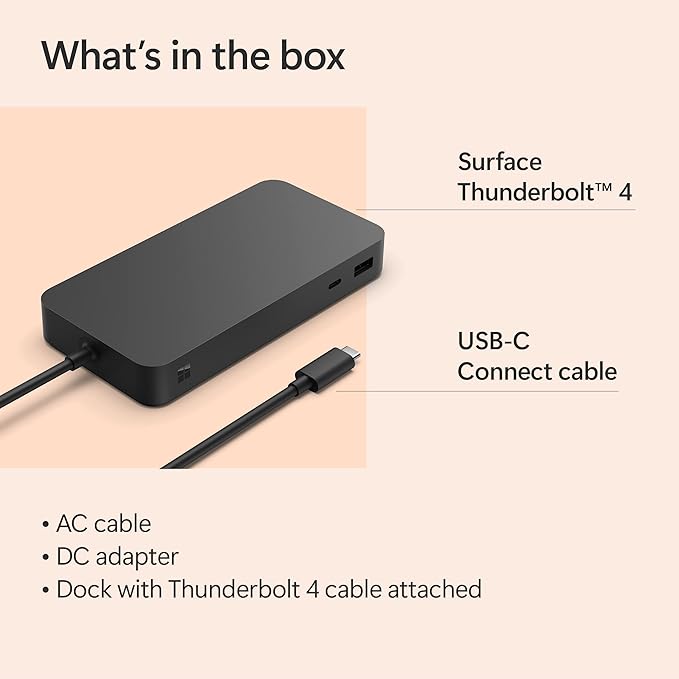
Answer: In the box, you will find the Microsoft Surface Thunderbolt 4 Docking Station along with a power supply and necessary cables. The inclusion of essential accessories ensures you have everything needed for immediate setup and use. This is particularly beneficial for users who are new to docking stations, as they won’t need to make additional purchases to start connecting their devices. -
Question:
Can I connect multiple devices to the Microsoft Surface Thunderbolt 4 Docking Station?
Answer: Yes, one of the key advantages of the Microsoft Surface Thunderbolt 4 Docking Station is its ability to connect multiple devices simultaneously. You can attach several USB peripherals, external displays, and networking devices at the same time. For example, a developer might connect a keyboard, mouse, two monitors, and a printer through the dock, creating an efficient and organized workspace. -
Question:
How can I troubleshoot common issues with the Microsoft Surface Thunderbolt 4 Docking Station?
Answer: Common troubleshooting for the Microsoft Surface Thunderbolt 4 Docking Station includes checking connections, ensuring power supply compatibility, and verifying device compatibility. If devices do not connect, check that all pins are free of debris and that the docking station firmware is up-to-date. Additionally, consulting the Microsoft support website can provide resources and steps for resolving connectivity issues effectively. -
Question:
Where can I buy Microsoft Surface Thunderbolt 4 Docking Station - Black T8H-00001?
Answer: You can buy the Microsoft Surface Thunderbolt 4 Docking Station - Black T8H-00001 from Ubuy. Ubuy offers a wide selection of electronic products, including Microsoft accessories, making it a reliable source for your purchase needs.
Microsoft Docking Stations T8H-00001 Editorial Review


No editorial reviews found
Customer Reviews & Ratings
247 customers ratings
-
5 Star
74%
-
4 Star
11%
-
3 Star
6%
-
2 Star
3%
-
1 Star
6%
Review this product
Share your thoughts with other customers
Platform Trust & Buyer Confidence

JK
Jasmin
Verified buyer
“Great products and very good service: very easy and very fast international delivery.”
9 September 2026 · via Trustpilot
AG
Anke
Verified buyer
“Wonderful online shopping experience, smooth transaction from the start. Payment method works conveniently and delivery is unexpectedly fast and reliable. You go the extra mile for service. What makes this even more amazing, you deliver to Namibia. I will remain a happy Ubuy customer and will increase my purchases for sure! Thank you!”
10 September 2026 · via Trustpilot
H
Hazel
Verified buyer
“Very easy to find the products what you need, and so fast delivery, that’s why I highly recommended to others costumers to used ubuy.”
10 September 2026 · via Trustpilot
O
Opaleye
Verified buyer
“I received exactly what I ordered I was skeptical about your site because that was my first time to order. But the order came timely and neatly packaged. I was not disappointed. Thank you.”
11 September 2026 · via Trustpilot
AC
Adele
Verified buyer
“Easy to find and order what you want on the website. Delivery is quick to the UK”
8 September 2026 · via Trustpilot
Secure Checkout
Global Delivery
Easy Returns
Genuine Products
Product Price History
Important information
- Limitations : For products shipped internationally, please note that any manufacturer warranty may not be valid; manufacturer service options may not be available; product manuals, instructions, and safety warnings may not be in destination country languages; the products (and accompanying materials) may not be designed in accordance with destination country standards, specifications, and labeling requirements; and the products may not conform to destination country voltage and other electrical standards (requiring use of an adapter or converter if appropriate). The recipient is responsible for assuring that the product can be lawfully imported to the destination country. When ordering from Ubuy or its affiliates, the recipient is the importer of record and must comply with all laws and regulations of the destination country.
- Not all the products listed on Ubuy are for sale, as Ubuy is a global search engine. Products are subject to export/trade regulations.
USD 271
Order now and get it around Wednesday, October 07
This item is not restrict in my country.(Please click on above link if this item is not restrict in your country, So our team will review and allow.)
QTY:
Only 1 item left in stock.
Secured transaction
PCI DSS compliant and ISO 27001:2022 certified, with encrypted payments and full buyer protection on every order.
Our Top Logistics Partners
Fastest cross-border delivery
Features & Benefits
- Lightning-fast Thunderbolt 4 ports for rapid data transfer and charging.
- Versatile with (3) USB-C, (3) USB-A ports, 2.5G Ethernet, and a security lock slot.
- Quick Charge capability powers up laptops in just 2.5 hours.
- Supports up to two 4K monitors for exceptional visual quality.
- Easy port identification with raised tactile indicators.
- Eco-friendly design made from 20% recycled ocean-bound plastic.
Ubuy Assurance
Experience worry-free shopping with 100% original products, PCI DSS-compliant payment security, ISO 27001-certified data protection, the fastest cross-border delivery, free returns *, and secure packaging on every order.